Guide to Setting Up Website Email on Mobile and Computer
Follow the guide to set up your domain email on any device or OS, including both smartphones and computers, quickly and easily.

We are with you with the video of the 10th training session of the WordPress management panel, with the topic of list
We are with you with the video of the 10th training session of the WordPress management panel .
The user section is always one of the most important sections in content management systems.
Some people know the importance of the user section only for store sites, but this part is also very important in non-store websites such as corporate and news.
Suppose you have a news or company website. Apart from yourself, you want someone else to enter content on the site, but you don't want to give full access to that person.
You want that person to only be able to enter content on the site, for this you need to learn the training of the user section, which we will review in the tenth session of the WordPress management panel training.
In this session, I will check the access level of users, which is called a role in WordPress.
Complete training on new user registration and user information editing.
Important points in user registration are fully explained in the training video.
It often happens that you have created a user and sent the information of that user to the desired person.
Now, for any reason, that user has forgotten or lost his password. Password recovery is required to enter the WordPress admin panel.
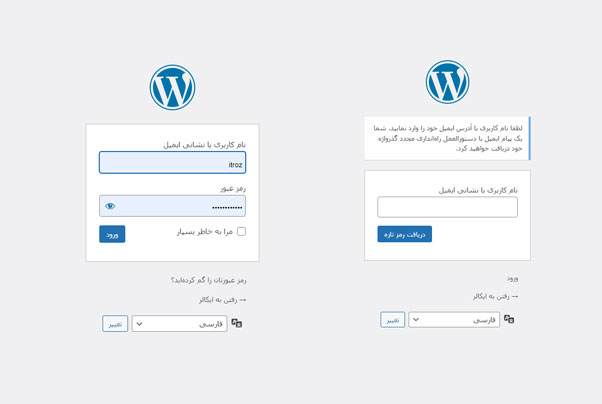
To do this, first enter the WordPress user area and click on the button you have lost your password on the left side.
After that, enter the new page you see in the right image and enter your username or email.
Note that before you forget your password, you must have your email login information or use an email that you have login information for.
After entering the username and email, click on the button to get a new password.
A new password link will be sent to your email. Enter your email, click on the link and enter the new password.
After registering the new password, go to the user section and enter the WordPress admin panel with the new password.
Source » Itroz Academy
Follow the guide to set up your domain email on any device or OS, including both smartphones and computers, quickly and easily.

This guide is useful for automatically forwarding your website emails set up on your domain to other email accounts, such as Gmail and others.

Step-by-step guide to install Thunderbird on macOS; download, setup, and manage multiple email accounts easily and efficiently.

Comprehensive guide to installing Thunderbird on iPhone; download the app, install it, and set up email step by step on your device.


Follow the guide to set up your domain email on any device or OS, including both smartphones and computers, quickly and easily.

This guide is useful for automatically forwarding your website emails set up on your domain to other email accounts, such as Gmail and others.

Comments (0)