Guide to Setting Up Website Email on Mobile and Computer
Follow the guide to set up your domain email on any device or OS, including both smartphones and computers, quickly and easily.

We are with you with the video of the 9th training session of the WordPress management panel, with the topic of list management
We are with you with the video of the ninth training session of the WordPress management panel .
In the last session, we talked about plugins or extensions, and in the video, it was said how to add any possibility to WordPress through this method.
Now, if we want to change the appearance of the site apart from adding features, what should we do? As you can see on different sites, the appearance of the sites is different.
For example, the appearance of a news site is different from a company or store site, and how can this change be applied in WordPress, which we will discuss in the ninth session of the WordPress management panel training.
The format that is considered for you in this tutorial is the professional J News format, which is a very famous news format.
We used a professional format in this training so that you can launch a professional website at the end of the training.
There are two types of templates or skins in WordPress. Templates that are included in the WordPress repository and are free. Templates that you have to pay to use and their features are not free.
Of course, commercial templates have more features and a better appearance than commercial templates. To compare the two, you can see the difference between free and premium site templates .
Since we have used the commercial template at the beginning of the training and explained the different sections with this template, you have learned how to work with the WordPress panel as well as the commercial template.
In this tutorial, the video of which is at the bottom of the page, we want to add a free template to the skin so that you can fully understand how to install and set up the template.
After installing the shell, I activate it so that it can be used.
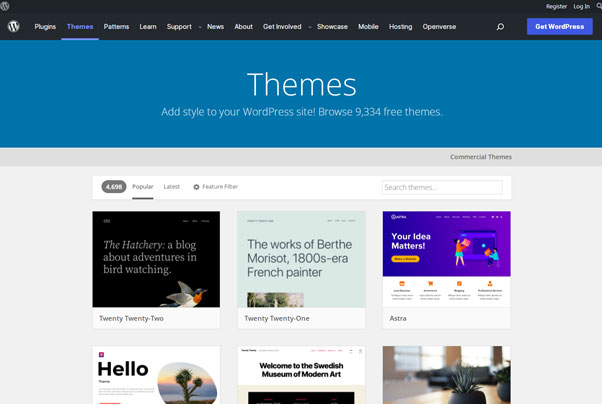
How to identify the best WordPress themes? Users are always interested in choosing the best templates for their site.
Because the template is an important part of the website and the speed of the site as well as the appearance and features all depend on the website template.
To choose the best template, you can click on the most popular templates through the WordPress repository in the filter section.
Or you can view the best website templates through the Iteroz site template tag.
In the ninth training session of the WordPress management panel training video, we have taught the important points of installing the WordPress skin.
Through this section, you can make changes in the format that we have discussed in full in the video.
Source » Itroz Academy

Follow the guide to set up your domain email on any device or OS, including both smartphones and computers, quickly and easily.

This guide is useful for automatically forwarding your website emails set up on your domain to other email accounts, such as Gmail and others.

Step-by-step guide to install Thunderbird on macOS; download, setup, and manage multiple email accounts easily and efficiently.

Comprehensive guide to installing Thunderbird on iPhone; download the app, install it, and set up email step by step on your device.


Follow the guide to set up your domain email on any device or OS, including both smartphones and computers, quickly and easily.

Comments (0)